
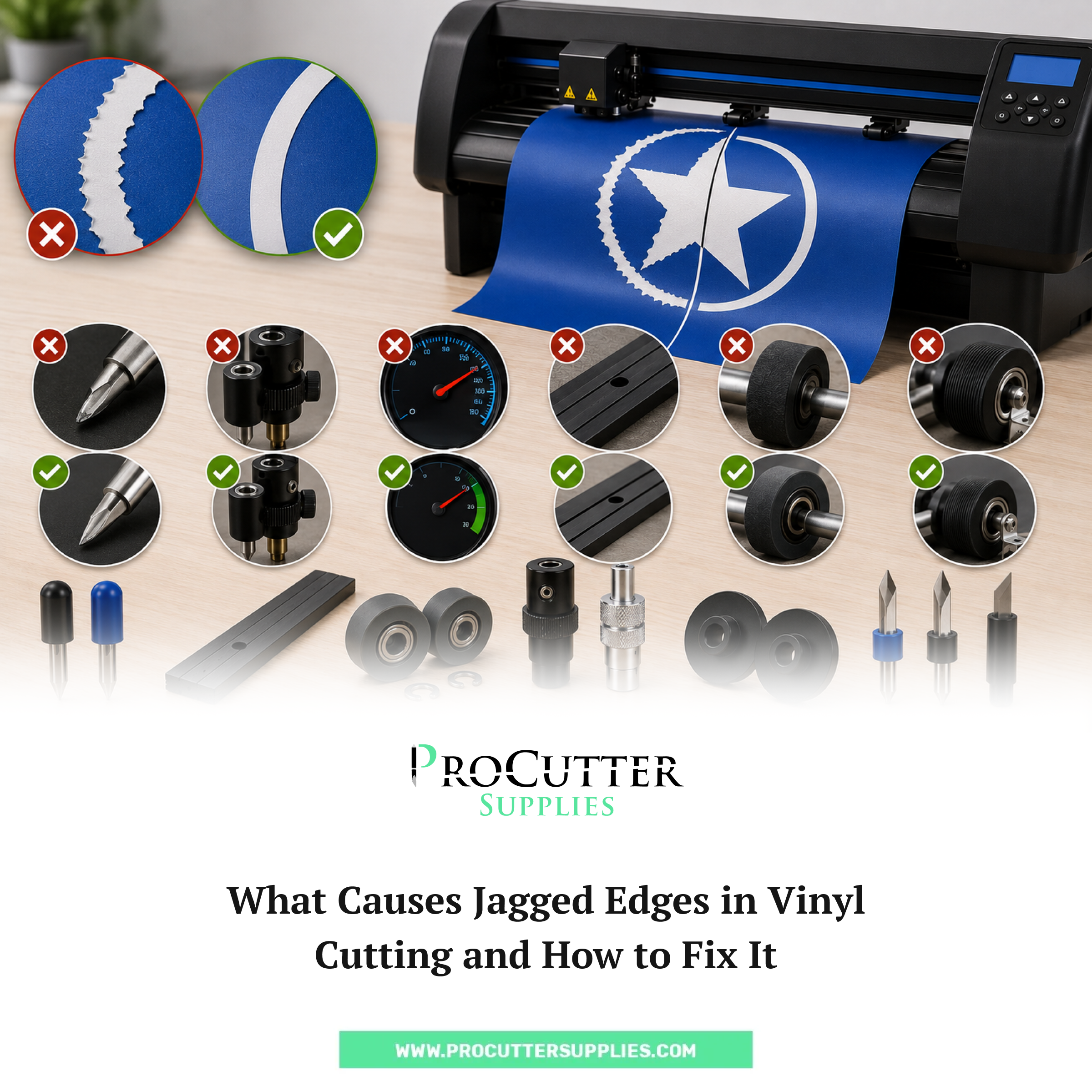
There is nothing more frustrating than pulling a freshly cut piece of vinyl off your machine and noticing the edges look rough, choppy, or just plain wrong. You set everything up, loaded the material, hit cut, and somewhere in that process something went sideways. Jagged edges are one of the most common complaints from vinyl cutter operators, whether they are running a small sign shop out of a garage or running production-level Summa equipment in a commercial setting. The good news is that most of the causes are pretty straightforward once you know what to look for, and the fixes are well within reach.
The Blade is Usually the First Thing to Check
When cuts come out rough, the blade is the obvious starting point, and honestly, it is the right one. A dull blade does not slice cleanly through vinyl. Instead of cutting, it drags and tears at the material. That dragging motion is what creates those uneven, jagged lines that ruin your output. Blades wear out faster than most people expect, especially when cutting thicker vinyl, textured materials, or running long production jobs back to back.
If you have not replaced your blade in a while and you are seeing rough cut quality, just swap it out first before doing anything else. It sounds simple, but a lot of operators troubleshoot everything else and overlook the blade entirely. On a Summa cutter specifically, using the correct blade for your material type makes a significant difference. The Summa Standard 36 Degree Drag Blade 5-pack is a reliable everyday option for standard vinyl cutting work, while the Standard 36 Degree Tangential Blade 5-pack handles more precise detail work with greater accuracy through corners and curves. Running a worn blade to save money almost always costs more in wasted material than the blade itself would have.
Blade Depth and Pressure Settings
Even a brand new blade can produce jagged cuts if it is not set up correctly. Too much blade exposure means the blade tip digs too deep, catches on the cutting strip, and loses smooth directional control. Too little exposure and the blade is not getting through the vinyl properly, which also creates rough or incomplete cuts.
The general rule for blade depth is that you want just enough tip exposed to cut through the vinyl and a tiny bit into the backing, but not through it entirely. A good way to test this is to cut a small circle on a scrap piece of your material. Peel up the circle. If it lifts cleanly and the backing underneath has a faint score mark but is not cut through, your depth is right. If the blade is punching through the backing, pull it back slightly.
Pressure settings work in tandem with blade depth. Too much downforce combined with too much blade exposure is a recipe for torn, jagged edges. Back both settings down and run a test before committing to a full production run. Summa cutters offer very fine control over these settings, so take advantage of that precision rather than guessing.
Speed Settings Are Often Overlooked
Speed is another factor people underestimate. Running your cutter too fast, especially through tight curves and sharp corners, causes the blade to lag slightly behind where it should be tracking. That lag shows up as rough edges and missed detail. Slowing the cutting speed, particularly for intricate designs or smaller lettering, often resolves the problem without any other changes needed.
This is especially true with tangential blade setups, where the blade orientation is controlled mechanically. At high speeds, the motor controlling blade angle can struggle to keep up with rapid directional changes, resulting in choppy corner cuts. Drop the speed by 20 to 30 percent and retest. In many cases that single adjustment cleans up the output dramatically.
The Cutting Strip Matters More Than You Think
The cutting strip sitting beneath the blade path is something a lot of operators ignore until it is visibly destroyed. But a worn or deeply grooved cutting strip directly affects cut quality. When the blade hits an old groove and drops into it, the cut line shifts slightly, and that shift creates irregularities in the edge quality of your vinyl.
On Summa vinyl cutters, the Summa Cutting Strip Replacement fits all roll-fed Summa models and is one of the most affordable maintenance items you can buy relative to the impact it has on output quality. Replacing it is quick, and if your cutter has been running for months without a cutting strip replacement, it is almost certainly contributing to any edge quality issues you are experiencing. A fresh cutting strip gives the blade a clean, consistent surface to cut against, which is exactly what you need for smooth, clean edges.
Media Tracking and Loading Problems
Sometimes jagged edges are not a blade or settings problem at all. They are a media problem. If the vinyl is not loaded straight and tracking properly through the machine, the material can shift slightly mid-cut. That shifting causes cuts that appear clean in some sections but rough in others, sometimes in a pattern that repeats at regular intervals.
Check that your Summa Pinch Rollers are in good condition and applying even, consistent pressure across the material. Worn or unevenly worn pinch rollers allow the vinyl to wander, and even a millimeter of drift in a tight design can cause noticeable cut quality issues. Also check your Media Guide Flanges to make sure the roll is feeding in straight. Any wobble in the feed path introduces inconsistency that shows up as edge irregularity in the finished cut.
Blade Holder Condition
The blade holder itself is something operators rarely consider until it fails completely. But worn or damaged blade holders affect how securely the blade is held during cutting. If the holder has any wobble or play, the blade tip moves slightly during cuts, and that micro-movement is enough to create rough edges, especially in curves and corners.
If you have replaced the blade and adjusted settings but are still seeing jagged results, inspect the Summa Drag Blade Knife Holder or Tangential Blade Holder depending on your setup. Holders that have taken a lot of use wear out at the blade seating point, and replacing them often reveals they were the root cause of edge quality problems that seemed mysterious.
Final Thoughts
Jagged edges in vinyl cutting almost always trace back to one of a handful of issues: a worn blade, incorrect settings, a damaged cutting strip, media tracking problems, or a worn blade holder. Working through these systematically rather than randomly changing things saves time and material. Start with the blade, move to settings, then check the mechanical components that guide and support the cut. Keeping genuine Summa consumables on hand so you can swap parts quickly is one of the best habits you can build as a cutter operator. Browse the full range of Summa vinyl cutter blades and accessories at ProCutter Supplies and keep your machine running clean.